Omnichord System One Operation Manual - Model OM-36
Make Music With Me
Omnichord Heaven digital archive
A faithful, searchable transcription of the Suzuki Omnichord System One owner documentation.
Every scanned page checked visually. Original diagrams retained; instructions and terminology preserved.
Omnichord System One Operation Manual - Model OM-36
Guitar, organ, piano, bass, drums...all in one!
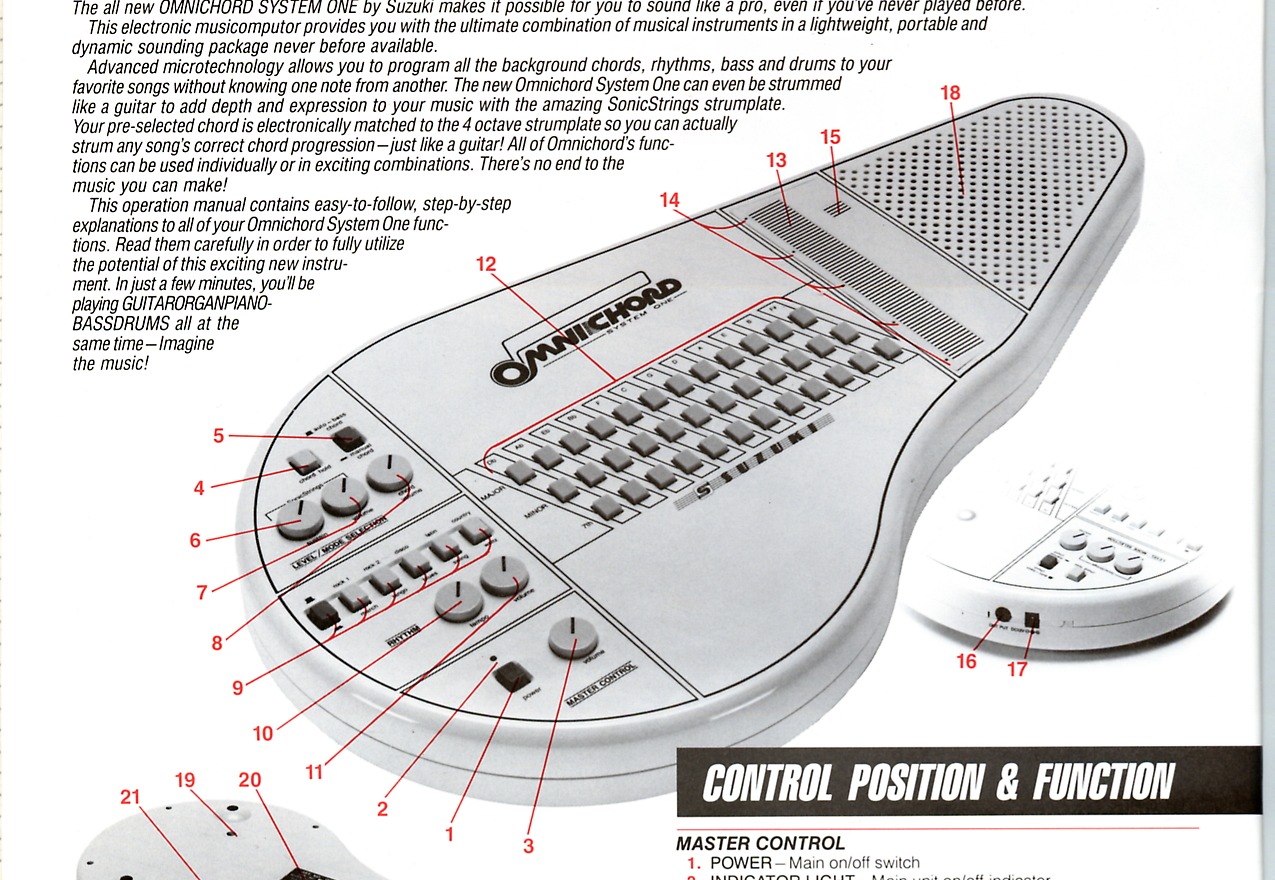
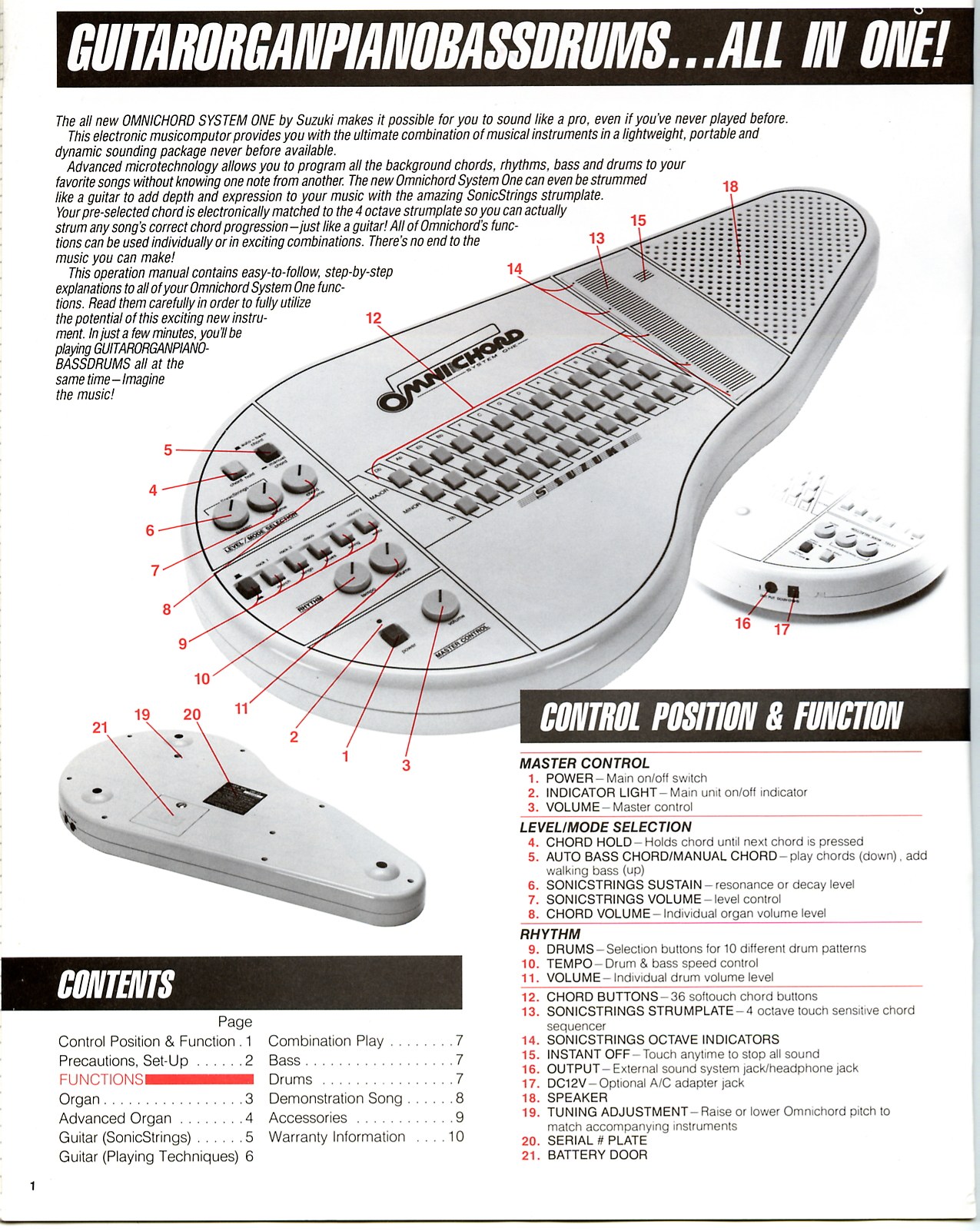
The all new OMNICHORD SYSTEM ONE by Suzuki makes it possible for you to sound like a pro, even if you've never played before. This electronic musicomputor provides you with the ultimate combination of musical instruments in a lightweight, portable and dynamic sounding package never before available.
Advanced microtechnology allows you to program all the background chords, rhythms, bass and drums to your favorite songs without knowing one note from another. The new Omnichord System One can even be strummed like a guitar to add depth and expression to your music with the amazing SonicStrings Strumplate.
Your pre-selected chord is electronically matched to the 4 octave strumplate so you can actually strum any song's correct chord progression - just like a guitar! All of Omnichord's functions can be used individually or in exciting combinations. There's no end to the music you can make!
This operation manual contains easy-to-follow, step-by-step explanations to all of your Omnichord System One functions. Read them carefully in order to fully utilize the potential of this exciting new instrument. In just a few minutes, you'll be playing guitar, organ, piano, bass and drums all at the same time - imagine the music!
Dos and don'ts to make your Omnichord last a lifetime
Omnichord System One is a unique musical instrument that allows anyone to make music instantly. This is accomplished by the use of a microprocessor which translates your commands into the language of music. All solid state components have been used in the electronic section of your Omnichord, which is protected by an unbreakable ABS plastic case. With a minimum of care, this product will provide years of dependable operation. Completely portable and always perfectly in tune, Omnichord goes anywhere the fun is. But no matter where you take Omnichord, always observe these important precautions:
Never leave your instrument near extreme heat or in the direct rays of the sunlight. Keep away from radiators, heaters or the back window ledge of your car.
Do not use your Omnichord near moisture or place liquids on top of, or near your instrument. If liquid is spilled inside the instrument, it will require extensive repairs.
To clean the cabinet, buttons or touchplate, use a soft, damp cloth. Gently wipe the surface of fingerprints, dust or dirt. Do not use solvents such as benzine or any abrasive cleaners. They will permanently damage the finish.
When not in use, turn your Omnichord off. This will not only prolong the battery life but reduce wear on all the electronic components.
When storing your Omnichord for long periods of time (30 days or more), it is advisable to remove the batteries entirely and store your Omnichord in a cool, dry place.
Your Omnichord is designed to operate with batteries (included) or use only the optional A/C or D/C adapters from Suzuki (models OCA-1 and OCD-12); see page 9. The use of any other power adapter can cause serious damage to the electronic components and void your warranty.
To avoid shock, never open the instrument. If service is needed, contact your Authorized Suzuki Musical Instrument Dealer for repair and parts. Opening the instrument will also void the warranty.
After removing the instrument, batteries and instruction manual from the packing carton and shipping materials, store the box and shipping material for use at a later time. They make an ideal container if it becomes necessary to transport the instrument.
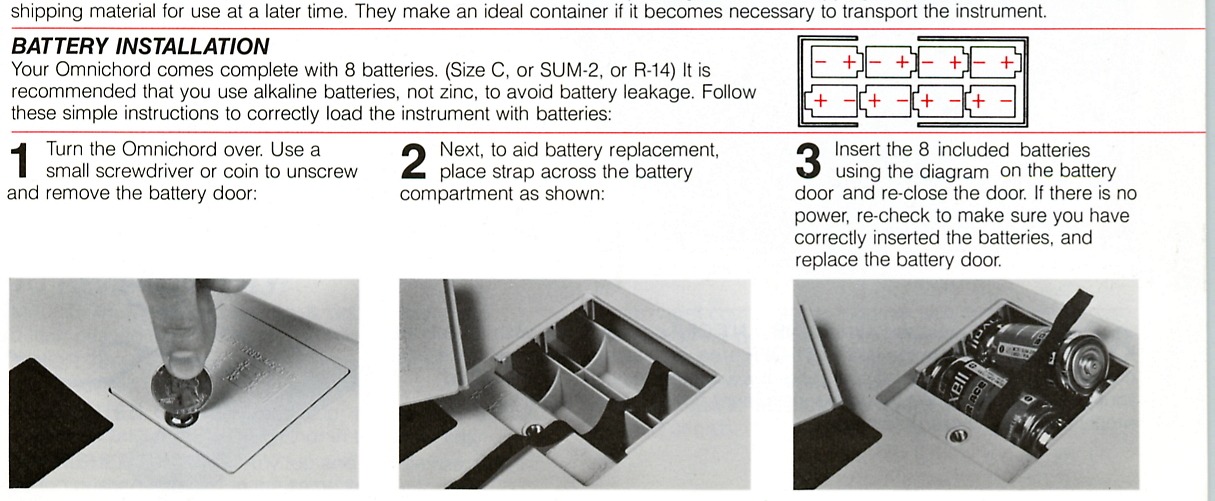
Your Omnichord comes complete with 8 batteries (Size C, SUM-2 or R-14). It is recommended that you use alkaline batteries, not zinc, to avoid battery leakage. Follow these simple instructions to correctly load the instrument with batteries:
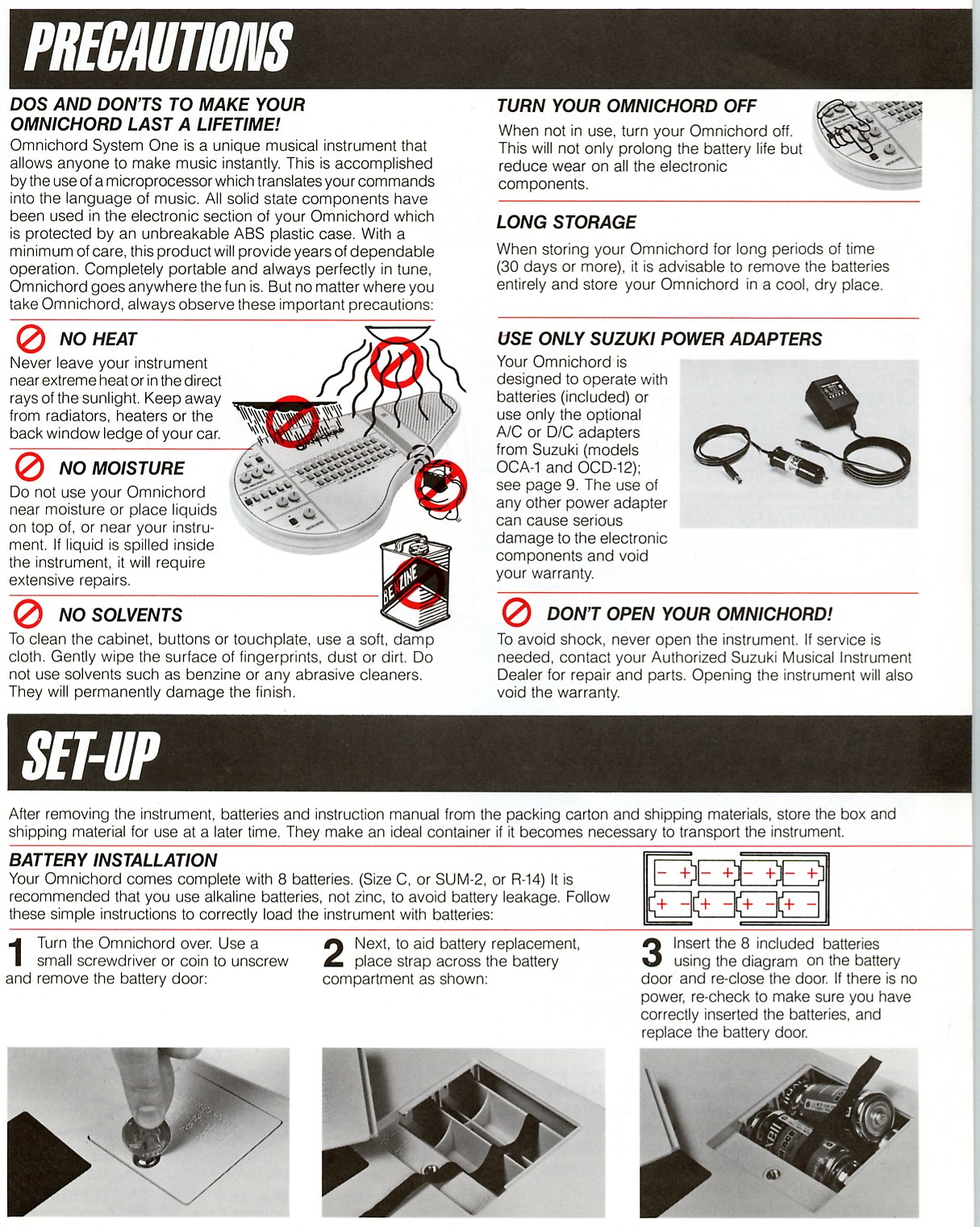
Major, minor and seventh chords
This section explains simple one finger chord play. By using only one finger, you can play major, minor or seventh chords in any key.
Begin by placing all the control buttons in the UP position. Now set up the Omnichord by following these steps:
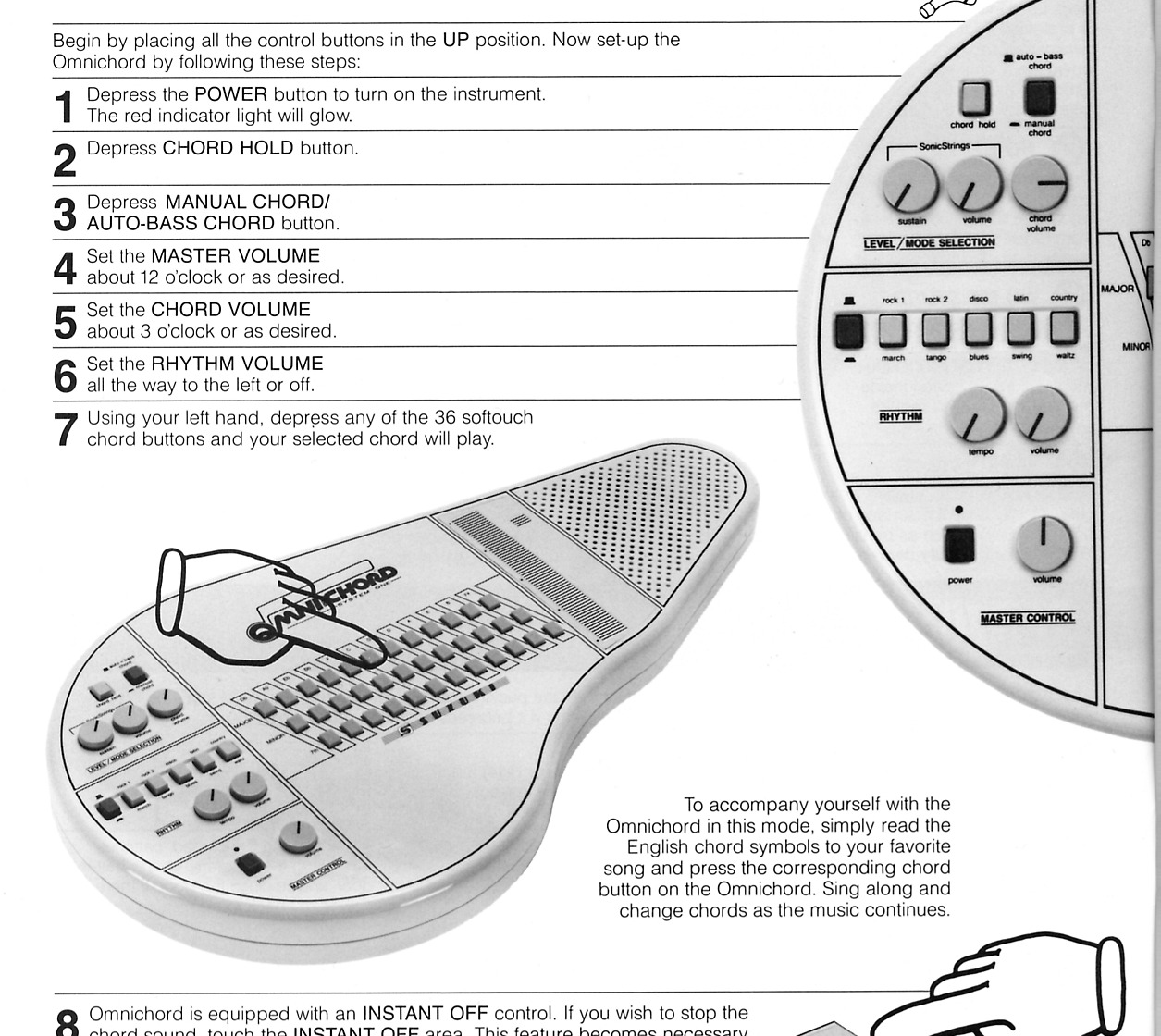
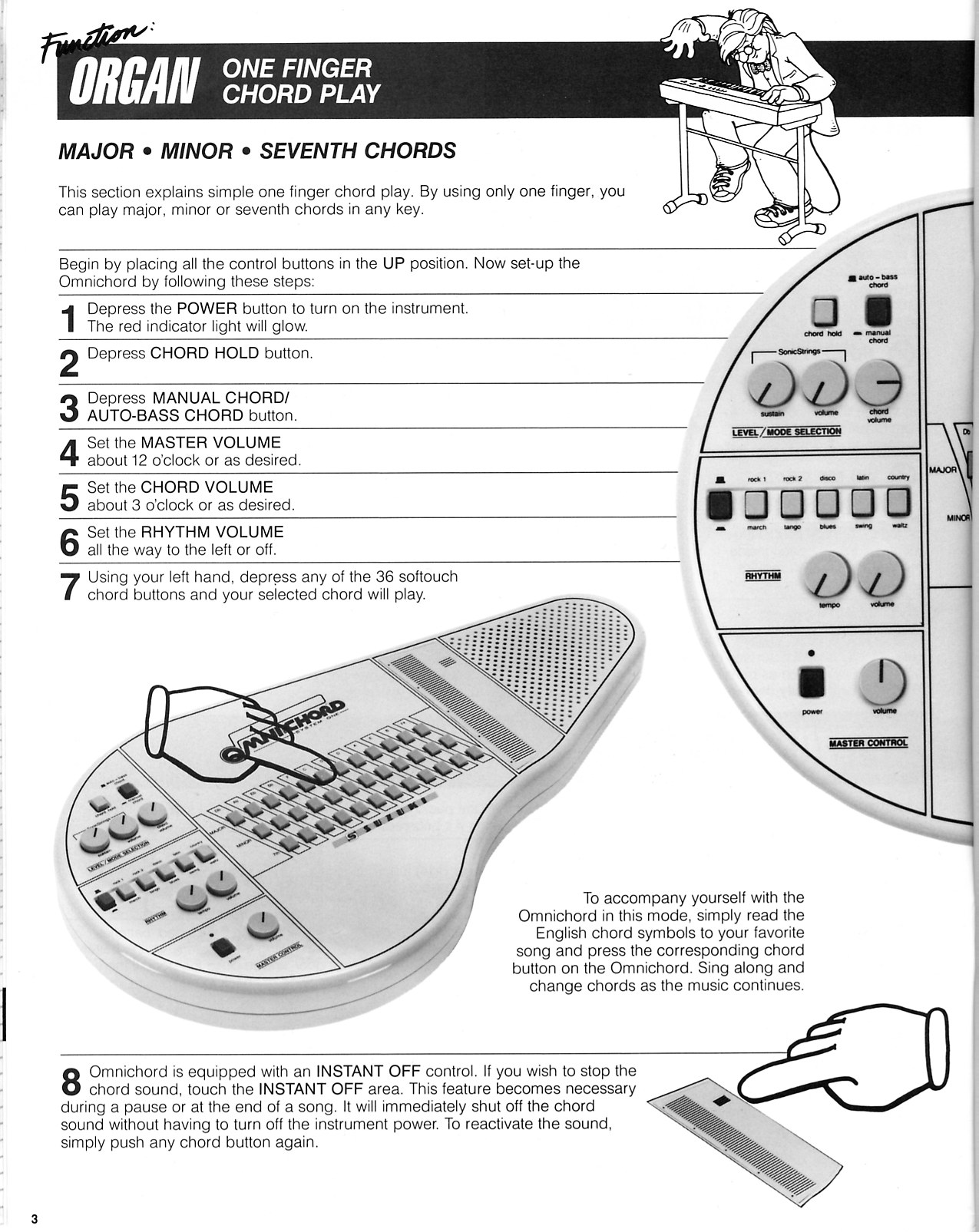
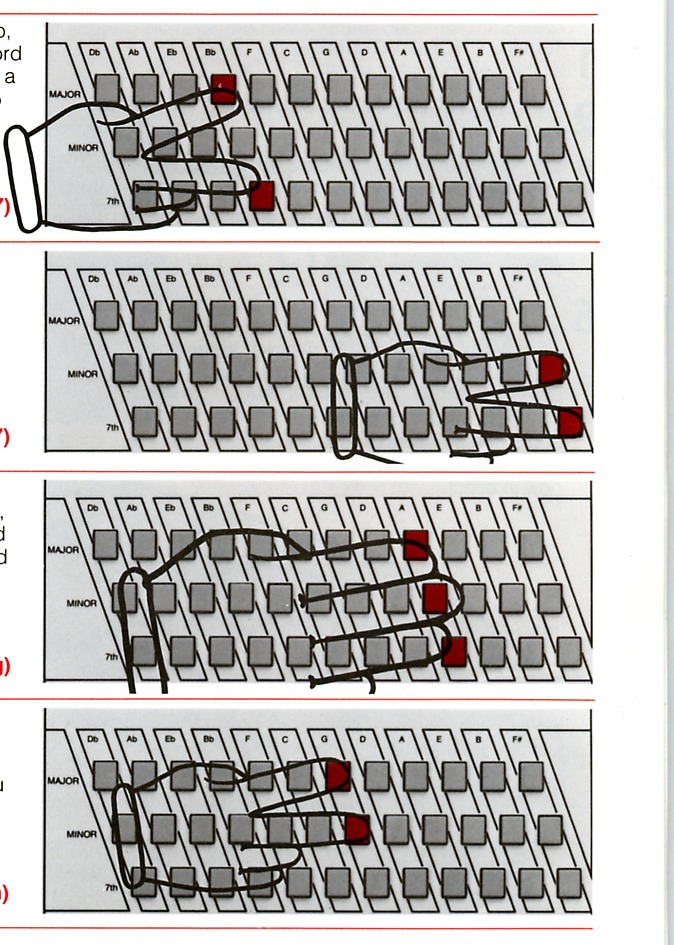
Major seventh, minor seventh, augmented and diminished chords
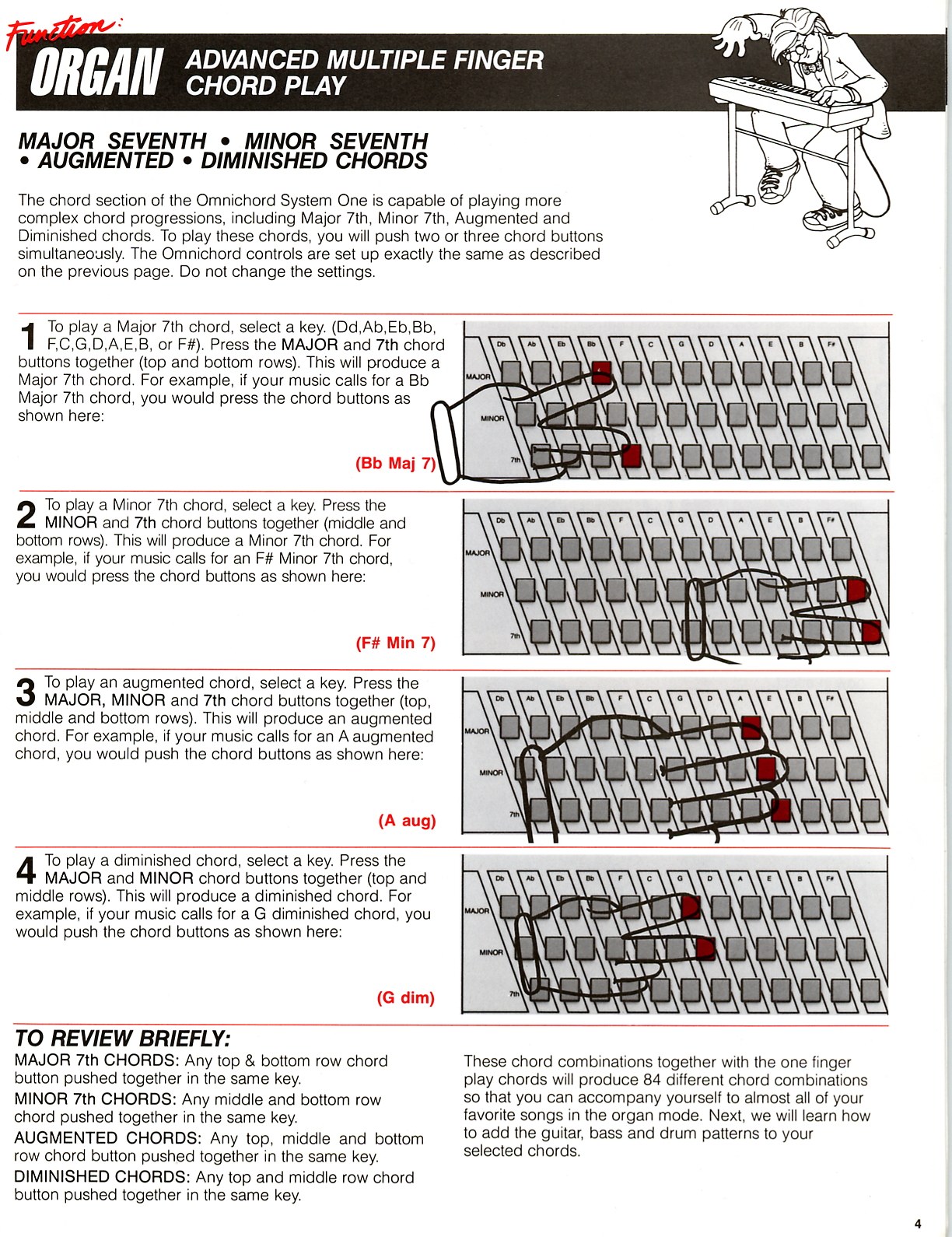
The chord section of the Omnichord System One is capable of playing more complex chord progressions, including Major 7th, Minor 7th, Augmented and Diminished chords. To play these chords, you will push two or three chord buttons simultaneously. The Omnichord controls are set up exactly the same as described on the previous page. Do not change the settings.
SonicStrings Strumplate set-up and play
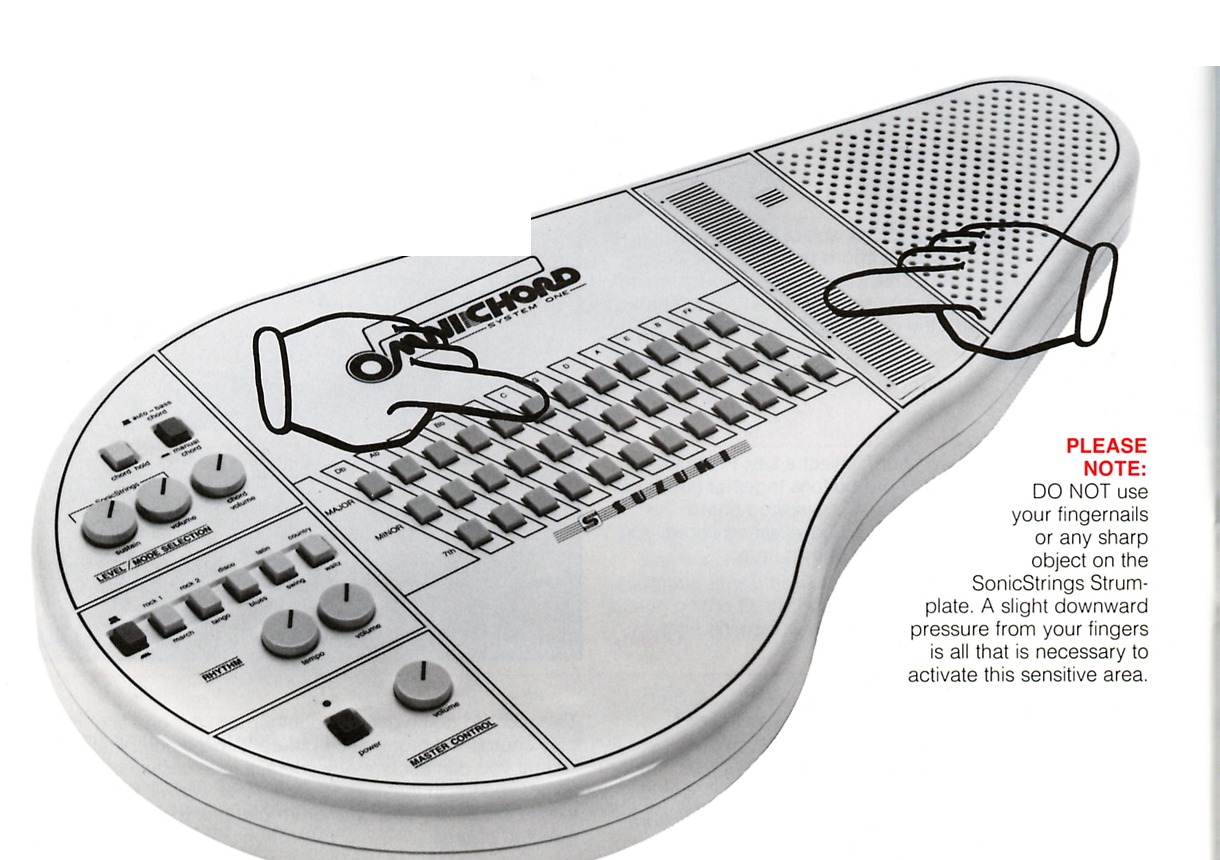
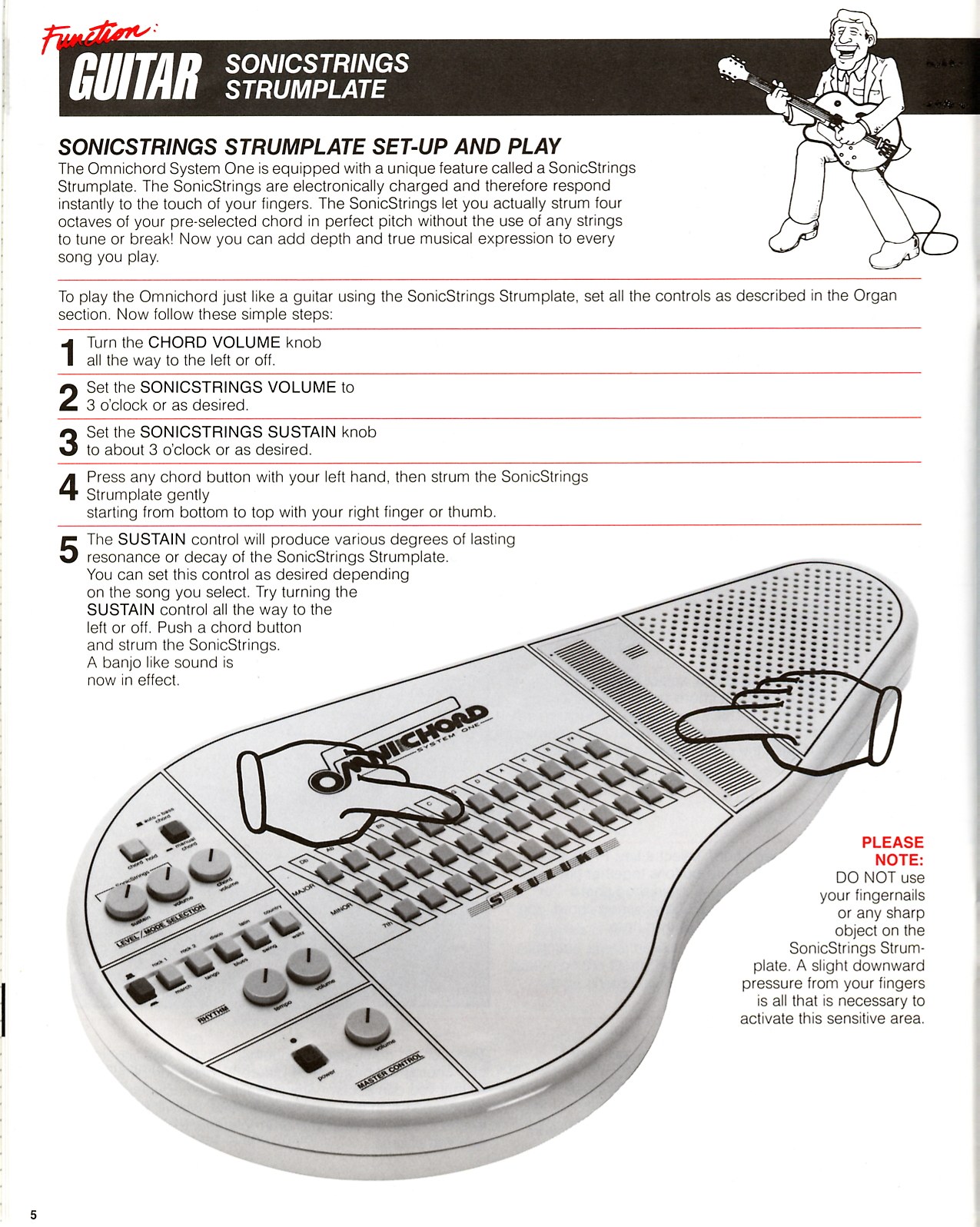
The Omnichord System One is equipped with a unique feature called a SonicStrings Strumplate. The SonicStrings are electronically charged and therefore respond instantly to the touch of your fingers. The SonicStrings let you actually strum four octaves of your pre-selected chord in perfect pitch without the use of any strings to tune or break! Now you can add depth and true musical expression to every song you play.
To play the Omnichord just like a guitar using the SonicStrings Strumplate, set all the controls as described in the Organ section. Now follow these simple steps:
SonicStrings Strumplate
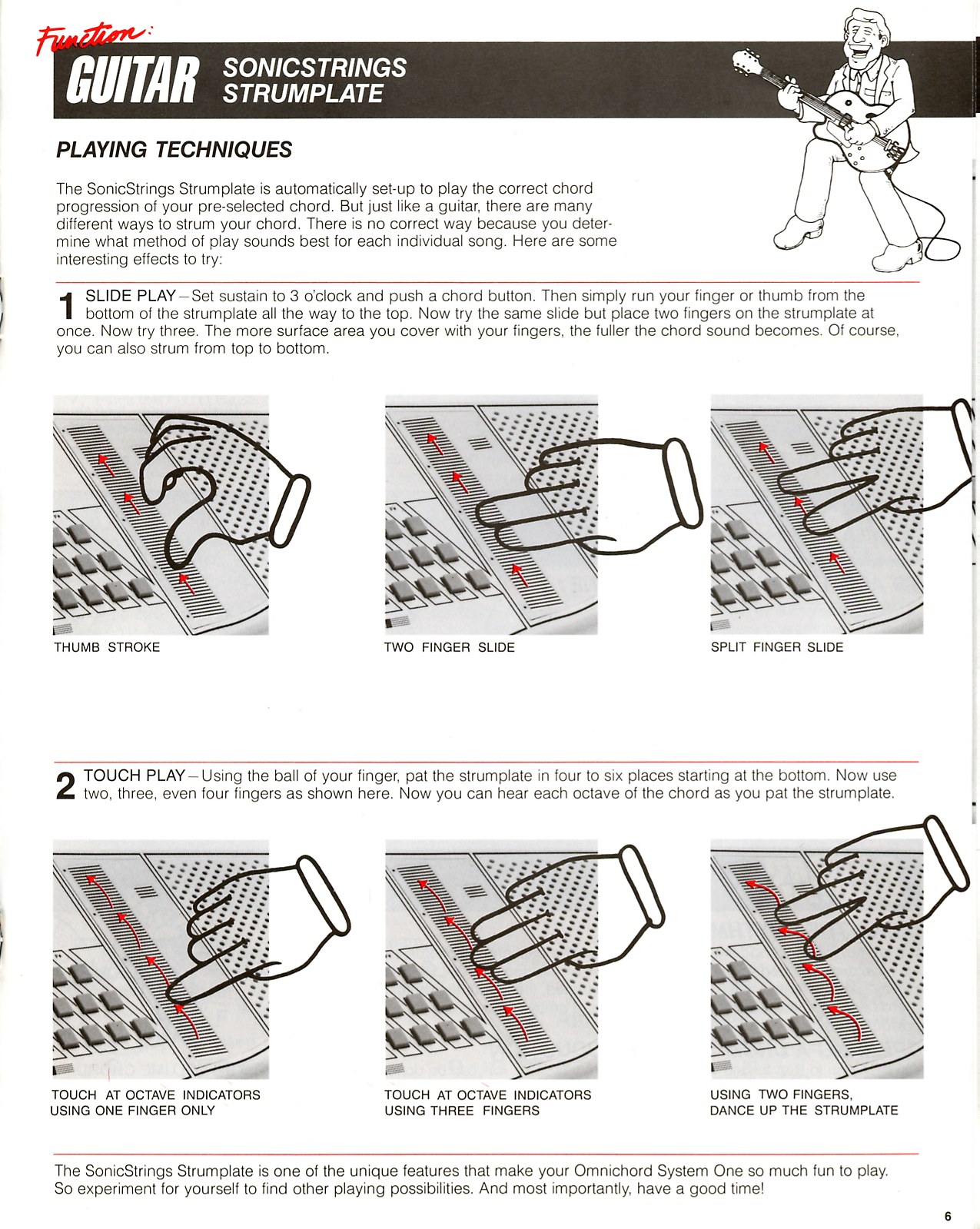
The SonicStrings Strumplate is automatically set up to play the correct chord progression of your pre-selected chord. But just like a guitar, there are many different ways to strum your chord. There is no correct way because you determine what method of play sounds best for each individual song. Here are some interesting effects to try:
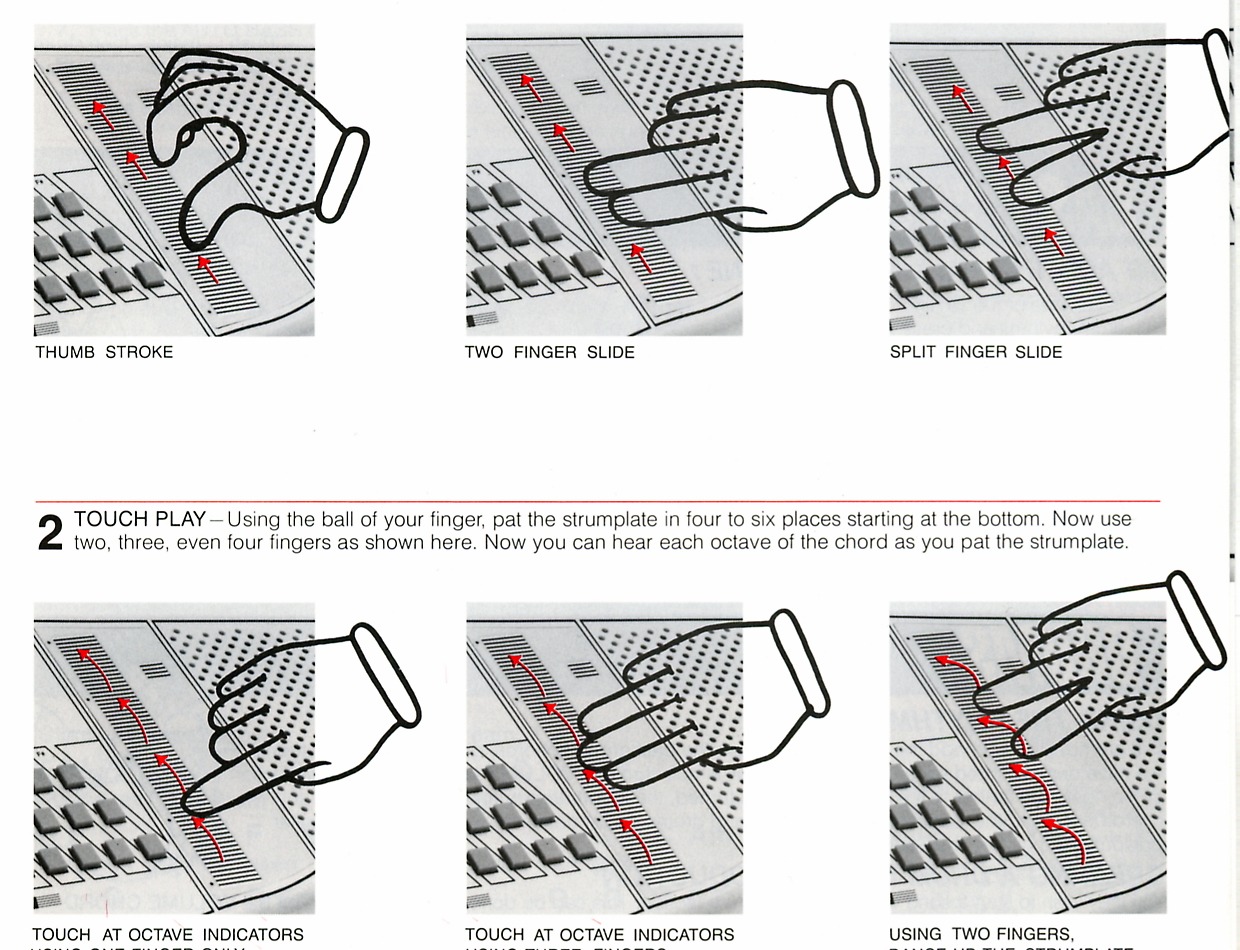
Set sustain to 3 o'clock and push a chord button. Then simply run your finger or thumb from the bottom of the strumplate all the way to the top. Now try the same slide but place two fingers on the strumplate at once. Now try three. The more surface area you cover with your fingers, the fuller the chord sound becomes. You can also strum from top to bottom.
Thumb stroke / Two finger slide / Split finger slide
Using the ball of your finger, pat the strumplate in four to six places starting at the bottom. Now use two, three, even four fingers as shown. You can hear each octave of the chord as you pat the strumplate.
Touch at octave indicators using one finger / Touch at octave indicators using three fingers / Using two fingers, dance up the strumplate
Combining all four sections
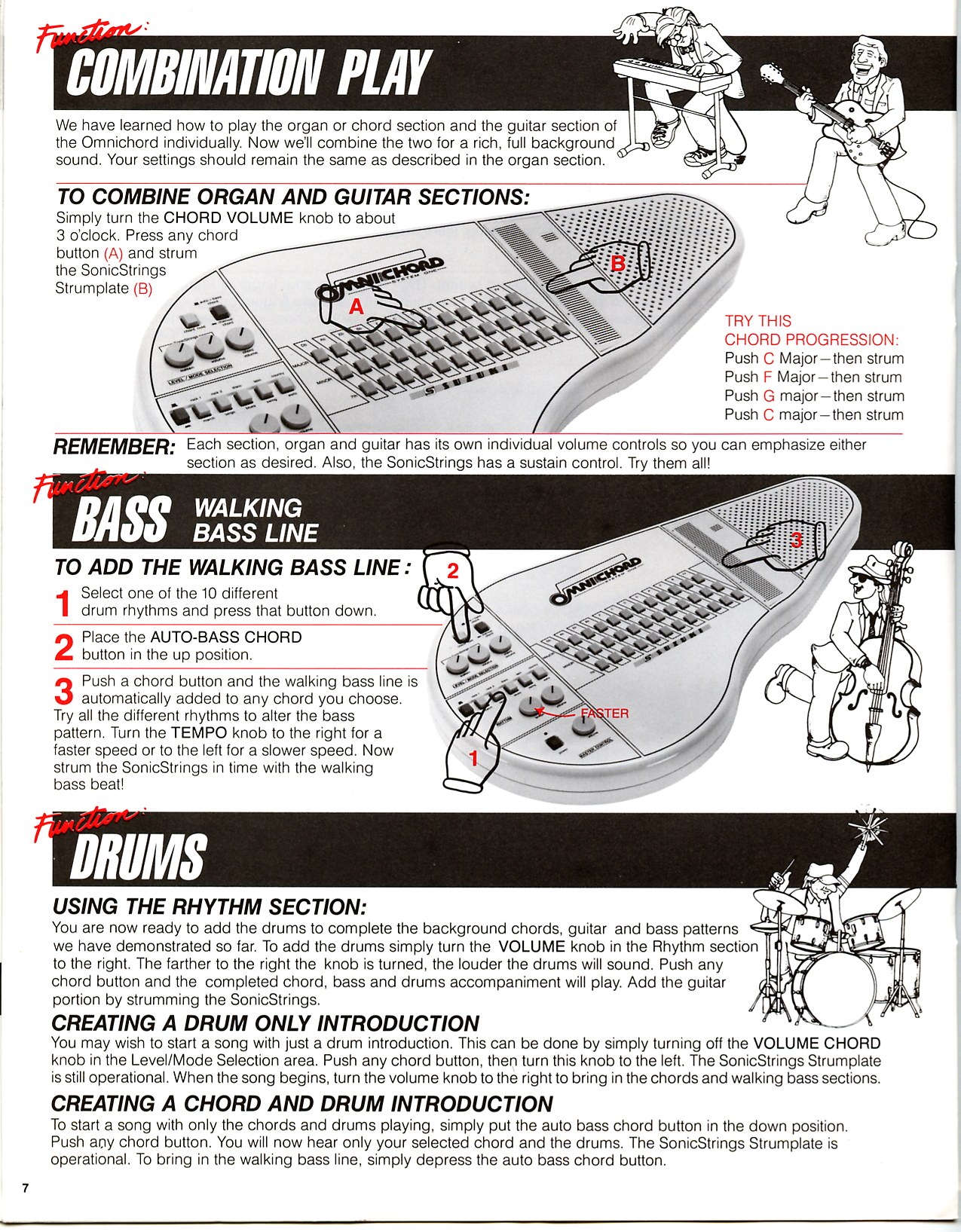
We have learned how to play the organ or chord section and the guitar section of the Omnichord individually. Now we'll combine the two for a rich, full background sound. Your settings should remain the same as described in the organ section.
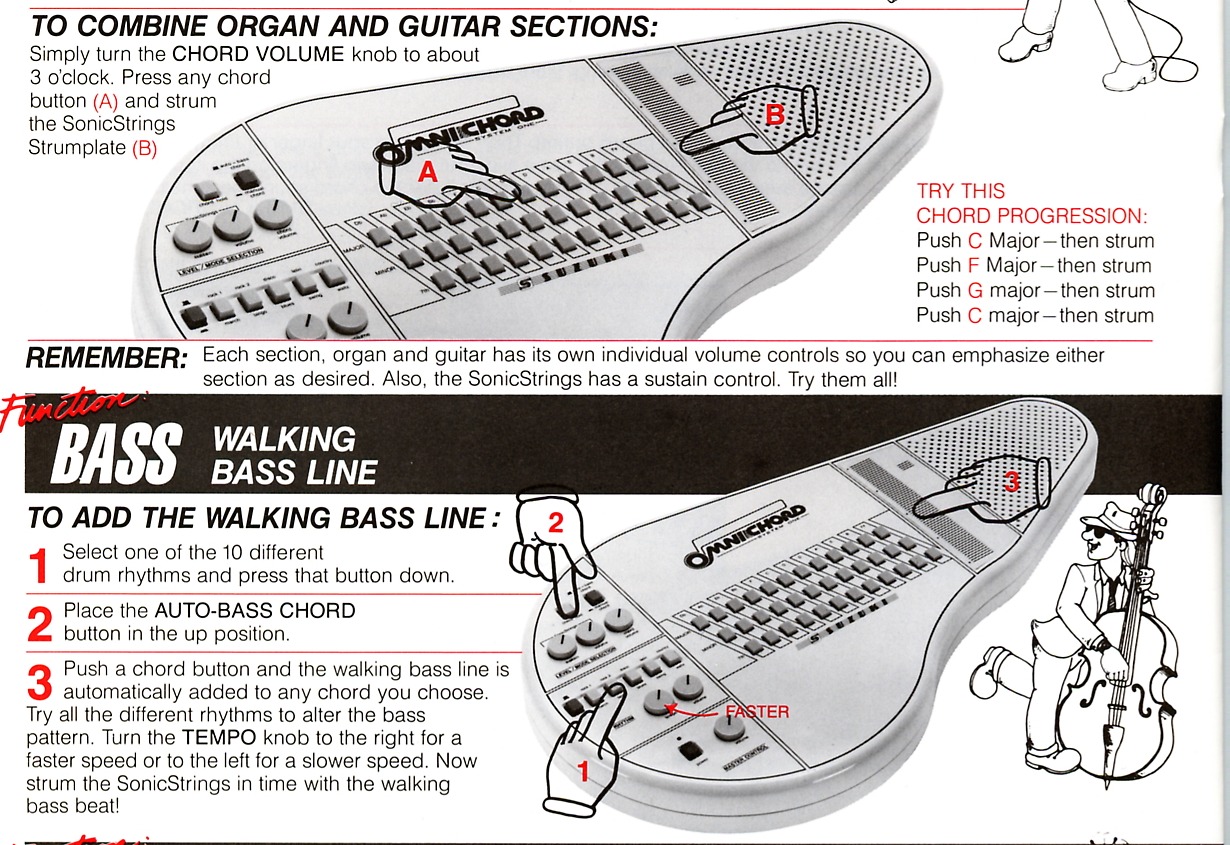
To combine organ and guitar sections, turn the CHORD VOLUME knob to about 3 o'clock. Press any chord button and strum the SonicStrings Strumplate.
Try this chord progression: push C Major, then strum; push F Major, then strum; push G Major, then strum; push C Major, then strum.
Try all the different rhythms to alter the bass pattern. Turn the TEMPO knob to the right for a faster speed or to the left for a slower speed. Now strum the SonicStrings in time with the walking bass beat!
You are now ready to add the drums to complete the background chords, guitar and bass patterns demonstrated so far. To add the drums, turn the VOLUME knob in the Rhythm section to the right. The farther to the right the knob is turned, the louder the drums will sound. Push any chord button and the completed chord, bass and drums accompaniment will play. Add the guitar portion by strumming the SonicStrings.
You may wish to start a song with just a drum introduction. This can be done by turning off the CHORD VOLUME knob in the Level/Mode Selection area. Push any chord button, then turn this knob to the left. The SonicStrings Strumplate is still operational. When the song begins, turn the volume knob to the right to bring in the chords and walking bass sections.
To start a song with only the chords and drums playing, put the AUTO BASS CHORD button in the down position. Push any chord button. You will now hear only your selected chord and the drums. The SonicStrings Strumplate is operational. To bring in the walking bass line, depress the AUTO BASS CHORD button.
Beginning level - a song combining simple functions
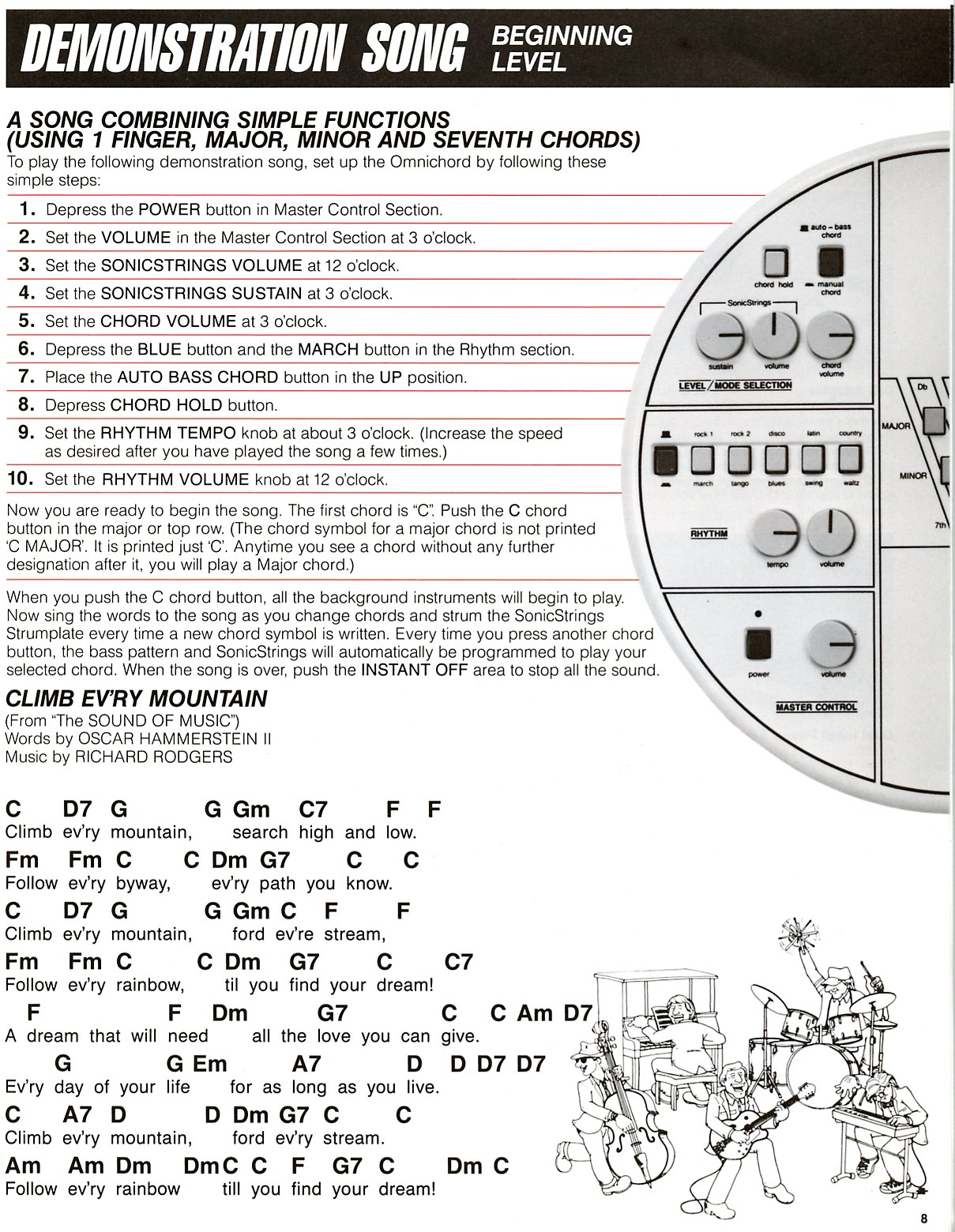
To play the following demonstration song, set up the Omnichord by following these simple steps:
Now you are ready to begin the song. The first chord is C. Push the C chord button in the major or top row. The chord symbol for a major chord is not printed as C MAJOR; it is printed just C. Any time you see a chord without any further designation after it, play a Major chord.
When you push the C chord button, all the background instruments will begin to play. Sing the words to the song as you change chords and strum the SonicStrings Strumplate every time a new chord symbol is written. Every time you press another chord button, the bass pattern and SonicStrings will automatically be programmed to play your selected chord. When the song is over, push the INSTANT OFF area to stop all the sound.
From The Sound of Music - words by Oscar Hammerstein II; music by Richard Rodgers
C    D7   G        G  Gm   C7       F   F
Climb ev'ry mountain, search high and low.
Fm   Fm   C        C  Dm   G7       C   C
Follow ev'ry byway, ev'ry path you know.
C    D7   G        G  Gm   C   F    F
Climb ev'ry mountain, ford ev'ry stream,
Fm   Fm   C        C  Dm   G7       C   C7
Follow ev'ry rainbow, 'til you find your dream!
F                 F  Dm        G7       C   C  Am  D7
A dream that will need all the love you can give.
G                 G  Em        A7       D   D  D7  D7
Ev'ry day of your life for as long as you live.
C    A7   D        D  Dm   G7   C       C
Climb ev'ry mountain, ford ev'ry stream.
Am   Am   Dm       Dm C    C    F   G7  C       Dm  C
Follow ev'ry rainbow 'til you find your dream!
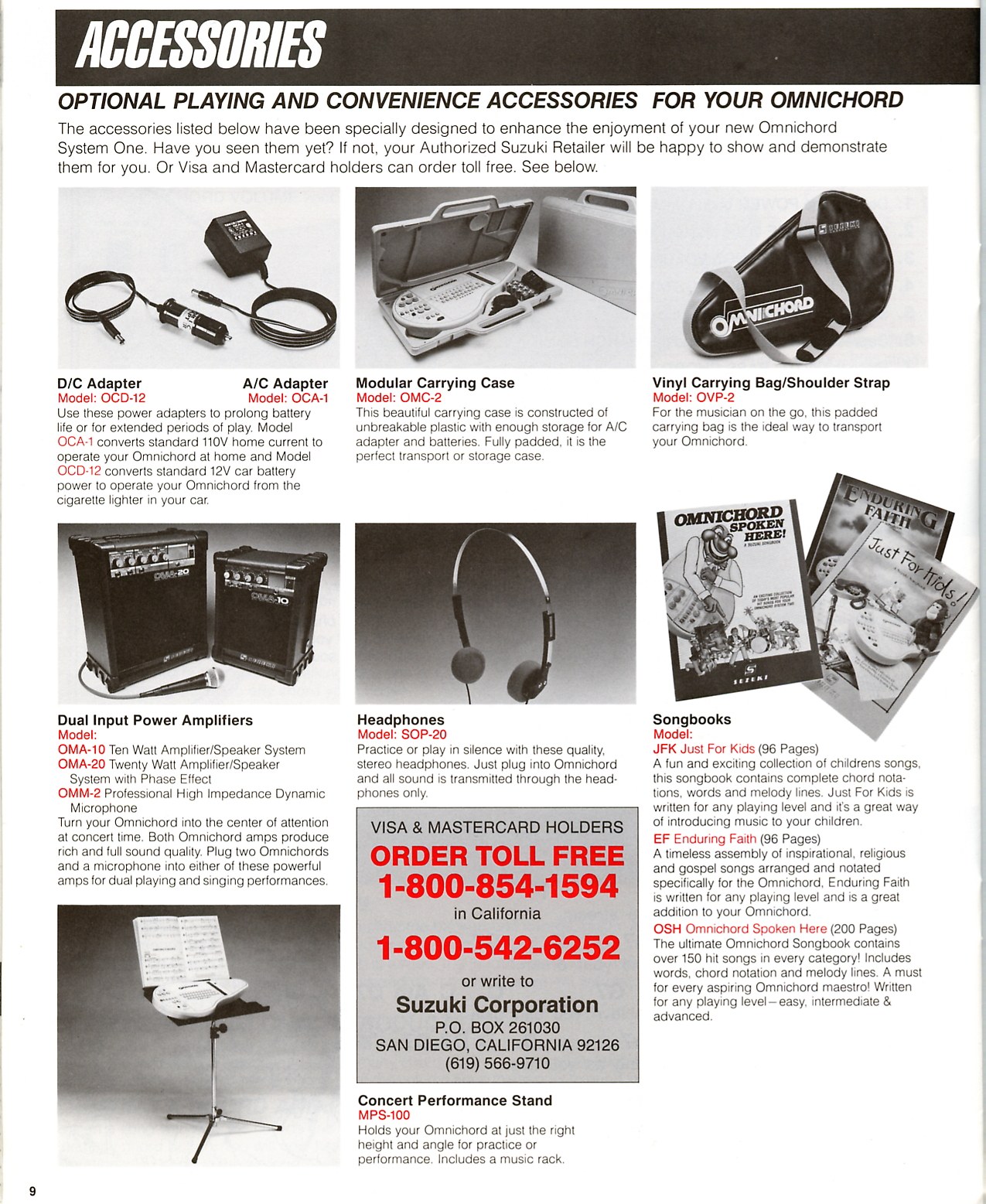
Optional playing and convenience accessories for your Omnichord
The accessories listed below were specially designed to enhance the enjoyment of your new Omnichord System One. The historical ordering information is reproduced from the original manual.
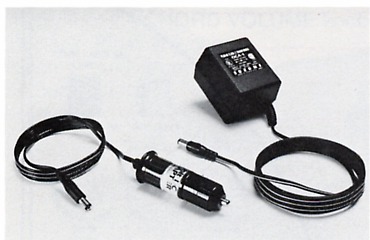
OCD-12 D/C Adapter; OCA-1 A/C Adapter
Use these power adapters to prolong battery life or for extended periods of play. Model OCA-1 converts standard 110V home current to operate your Omnichord at home, and Model OCD-12 converts standard 12V car battery power to operate your Omnichord from the cigarette lighter in your car.
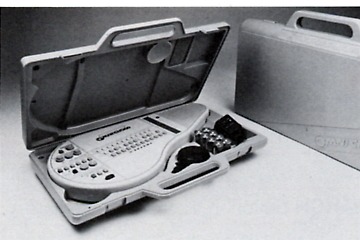
OMC-2
This carrying case is constructed of unbreakable plastic with enough storage for the A/C adapter and batteries. Fully padded, it is the perfect transport or storage case.
OVP-2
For the musician on the go, this padded carrying bag is the ideal way to transport your Omnichord.

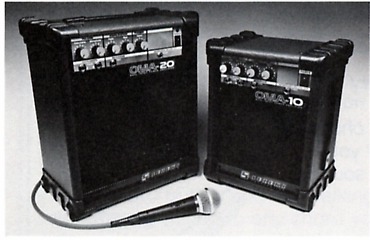
OMA-10; OMA-20; OMM-2 microphone
Turn your Omnichord into the center of attention at concert time. Both Omnichord amps produce rich and full sound quality. Plug two Omnichords and a microphone into either of these powerful amps for dual playing and singing performances.
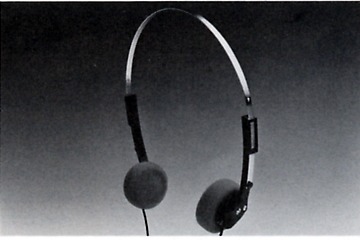
SOP-20
Practice or play in silence with these quality stereo headphones. Plug into the Omnichord and all sound is transmitted through the headphones only.
JFK Just For Kids; EF Enduring Faith; OSH Omnichord Spoken Here
Just For Kids (96 pages) contains children's songs with chord notation, words and melody lines. Enduring Faith (96 pages) collects inspirational, religious and gospel songs arranged for Omnichord. Omnichord Spoken Here (200 pages) contains more than 150 hit songs with words, chord notation and melody lines for easy, intermediate and advanced players.

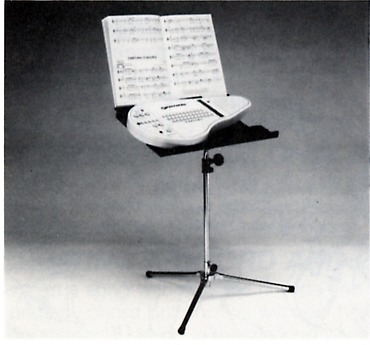
MPS-100
Holds your Omnichord at just the right height and angle for practice or performance. Includes a music rack.
The Suzuki Limited Warranty
This product, except the exterior cosmetic parts, is warranted by the Suzuki Corporation to the original purchaser to be free from defects in material and workmanship under normal use, as follows:
In the event repairs are needed, the original purchaser will return the product to an Authorized Suzuki Retail Center with proof of purchase. The dealer will then repair the product or return it to the Suzuki distribution center in San Diego, California for repairs. Upon completion of the repair, the unit will be returned to the dealer freight pre-paid. This warranty will not apply to this product if it has been misused, abused or altered. This warranty is void if the product is opened. Without limiting the foregoing, bending, dropping of unit, or visible cracks and/or scratches are presumed to be defects resulting from misuse or abuse.
Neither this warranty nor any other warranty expressed or implied, including implied warranties of merchantability, shall extend beyond the warranty period. No responsibility is assumed for any incidental or consequential damages.
In the United States: Suzuki Corporation, San Diego Distribution Center, P.O. Box 261030, San Diego, California 92126.
All other countries: Contact the original retailer where the product was purchased for additional warranty details.


Model OM-36 Operation Manual
Suzuki Musical Instrument Manufacturing Company, Ltd.
Hamamatsu, Japan
Printed in Japan
Copyright 1987 Suzuki Musical Instrument Corporation