A/C Adapter
OCA
Your TRONICHORD was designed to be completely portable. However, the A/C adapter plugs easily into the side of the cabinet in plug 7 & then into any wall plug. Use during extended periods of play and to prolong battery life.
Omnichord Heaven digital archive
A searchable reconstruction of the original six-page instruction manual, with every supplied scan retained as a facsimile.
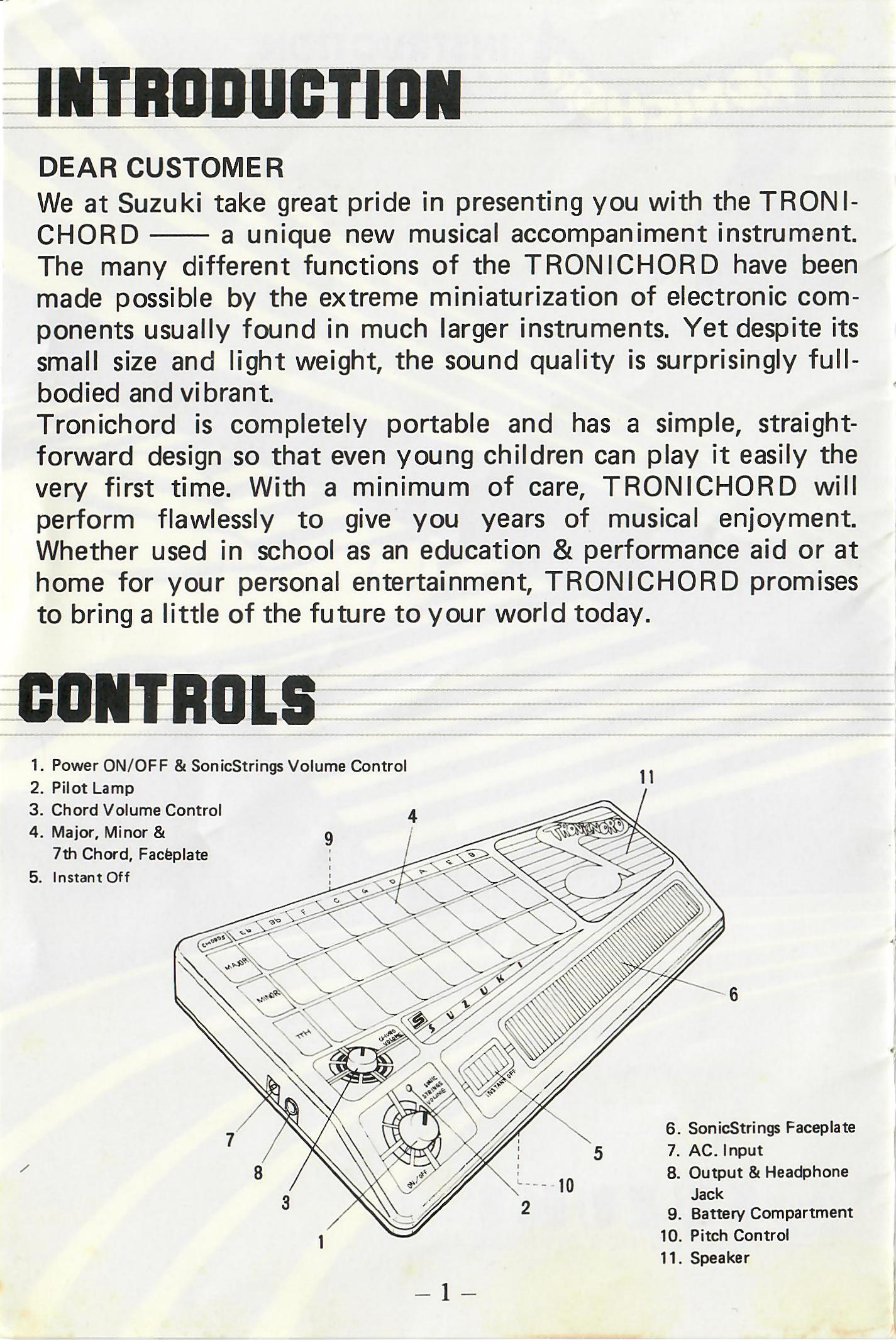
Dear Customer
We at Suzuki take great pride in presenting you with the TRONICHORD — a unique new musical accompaniment instrument. The many different functions of the TRONICHORD have been made possible by the extreme miniaturization of electronic components usually found in much larger instruments. Yet despite its small size and light weight, the sound quality is surprisingly full-bodied and vibrant.
Tronichord is completely portable and has a simple, straightforward design so that even young children can play it easily the very first time. With a minimum of care, TRONICHORD will perform flawlessly to give you years of musical enjoyment. Whether used in school as an education & performance aid or at home for your personal entertainment, TRONICHORD promises to bring a little of the future to your world today.
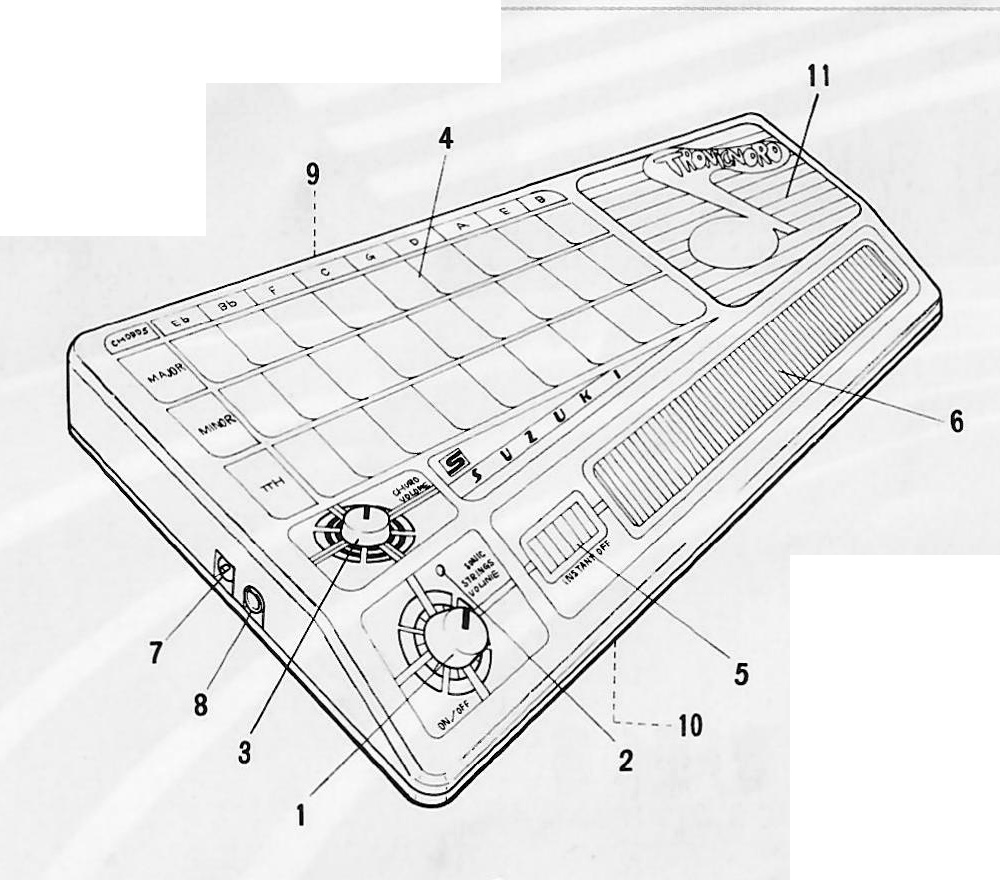
Remove the TRONICHORD from its packing carton and place it on a flat surface in front of you. Open the battery compartment on the back side and place 8 × SUM-3 (AA size) or R6 or equivalent size batteries inside and close the door. The optional AC adaptor can also be used.
Do not leave the TRONICHORD near a heater or expose it to direct sunlight, excessive dust, moisture or rain.
To clean, simply wipe with a damp cloth. Never use detergents or abrasives as this will damage the cabinet. Always turn the TRONICHORD off when not in use.
Turn the SONICSTRINGS VOLUME control knob to the right (the Pilot lamp lights up) and adjust the control knob to suit the level of your performance.
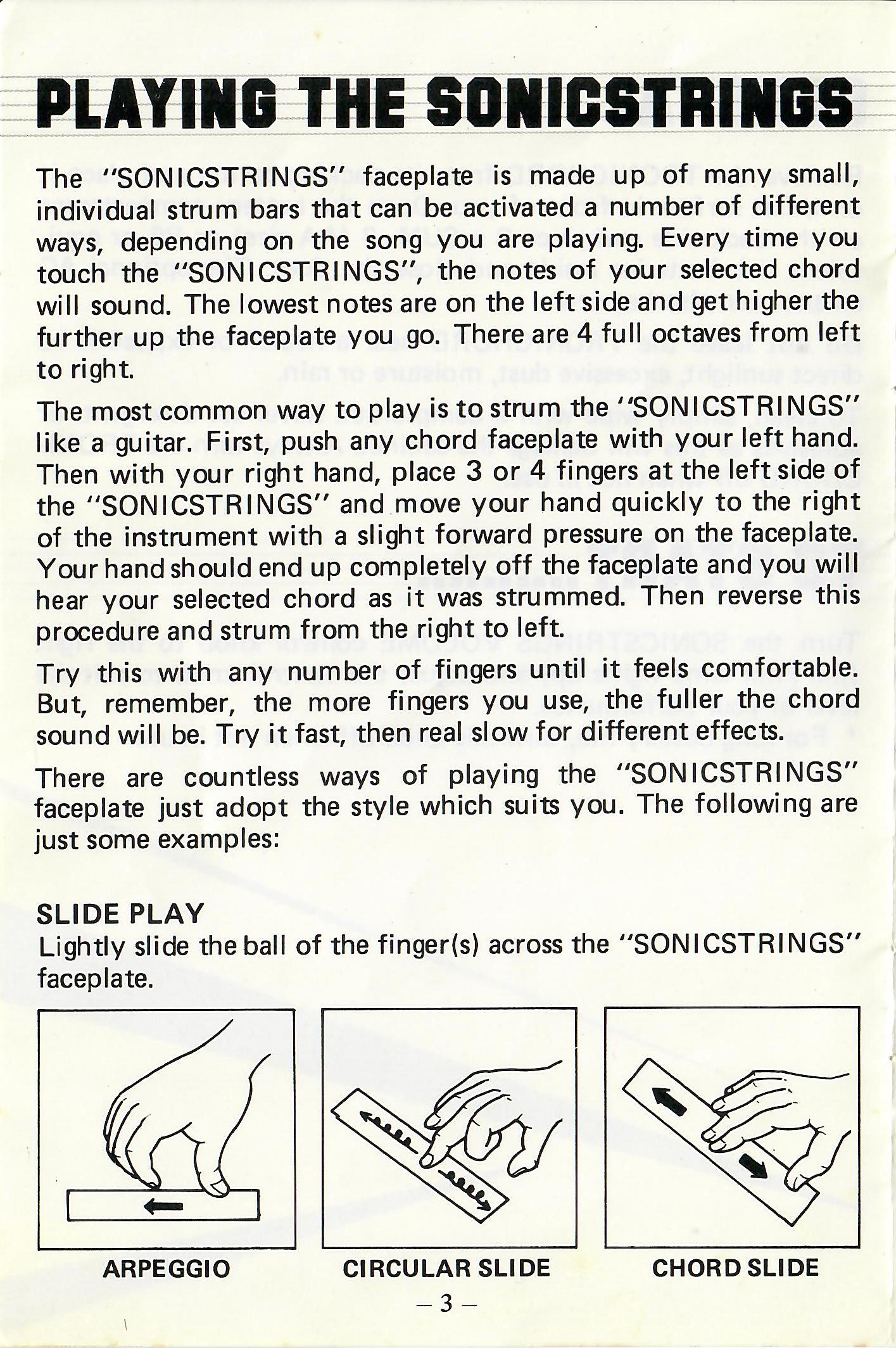
The “SONICSTRINGS” faceplate is made up of many small, individual strum bars that can be activated a number of different ways, depending on the song you are playing. Every time you touch the “SONICSTRINGS”, the notes of your selected chord will sound. The lowest notes are on the left side and get higher the further up the faceplate you go. There are 4 full octaves from left to right.
The most common way to play is to strum the “SONICSTRINGS” like a guitar. First, push any chord faceplate with your left hand. Then with your right hand, place 3 or 4 fingers at the left side of the “SONICSTRINGS” and move your hand quickly to the right of the instrument with a slight forward pressure on the faceplate. Your hand should end up completely off the faceplate and you will hear your selected chord as it was strummed. Then reverse this procedure and strum from the right to left.
Try this with any number of fingers until it feels comfortable. But, remember, the more fingers you use, the fuller the chord sound will be. Try it fast, then real slow for different effects.
There are countless ways of playing the “SONICSTRINGS” faceplate; just adopt the style which suits you. The following are just some examples.
Lightly slide the ball of the finger(s) across the “SONICSTRINGS” faceplate.
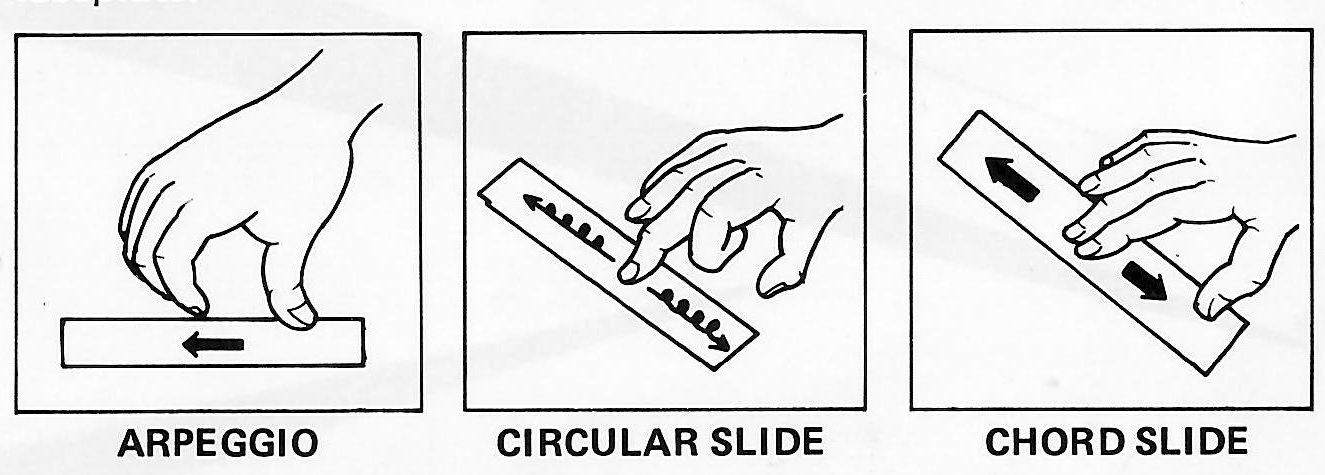
Arpeggio · Circular Slide · Chord Slide
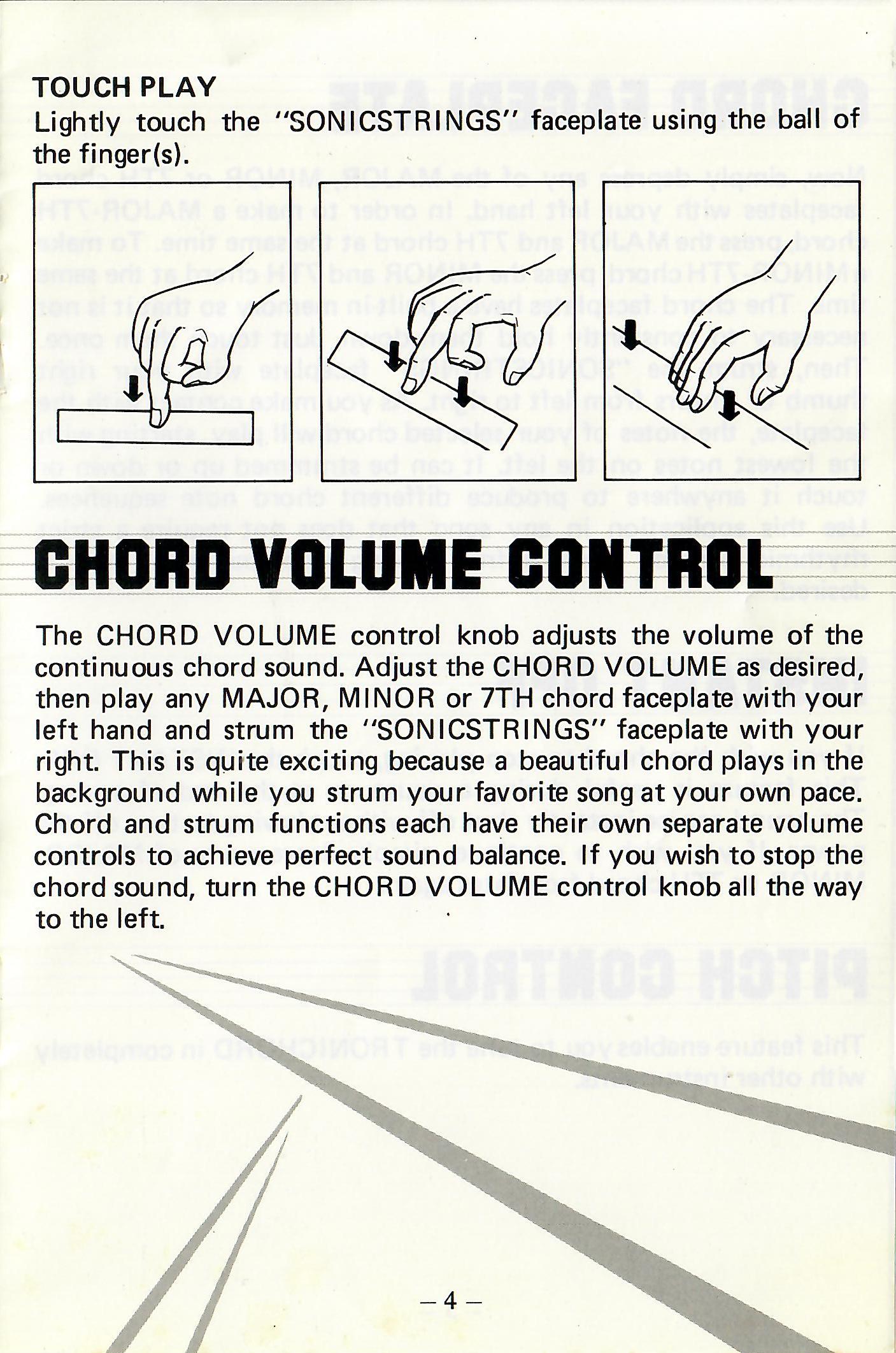
Lightly touch the “SONICSTRINGS” faceplate using the ball of the finger(s).
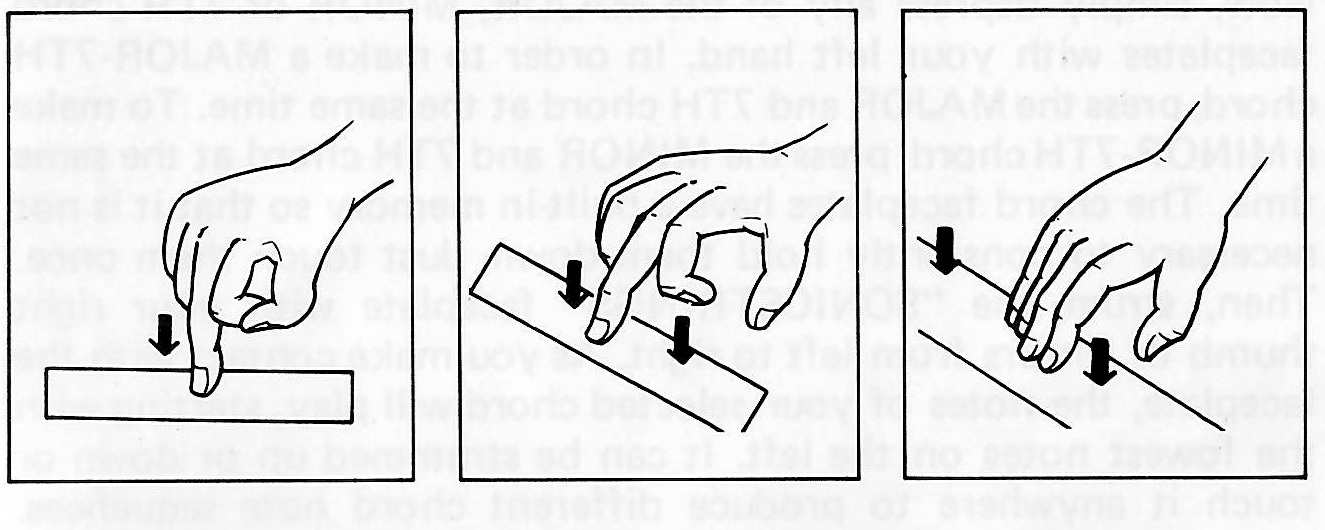
The CHORD VOLUME control knob adjusts the volume of the continuous chord sound. Adjust the CHORD VOLUME as desired, then play any MAJOR, MINOR or 7TH chord faceplate with your left hand and strum the “SONICSTRINGS” faceplate with your right. This is quite exciting because a beautiful chord plays in the background while you strum your favorite song at your own pace. Chord and strum functions each have their own separate volume controls to achieve perfect sound balance. If you wish to stop the chord sound, turn the CHORD VOLUME control knob all the way to the left.
Now, simply depress any of the MAJOR, MINOR or 7TH chord faceplates with your left hand. In order to make a MAJOR-7TH chord, press the MAJOR and 7TH chord at the same time. To make a MINOR-7TH chord, press the MINOR and 7TH chord at the same time. The chord faceplates have a built-in memory so that it is not necessary to constantly hold them down. Just touch them once. Then, strum the “SONICSTRINGS” faceplate with your right thumb or fingers from left to right. As you make contact with the faceplate, the notes of your selected chord will play, starting with the lowest notes on the left. It can be strummed up or down or touched anywhere to produce different chord note sequences. Use this application in any song that does not require a strict rhythmic beat or where a free-moving accompaniment style is desired.
If you wish the chord to stop playing, touch the INSTANT OFF. This feature is useful during a pause or at the end of a song. The sound can be instantly shut off without having to turn off the power. If you wish to continue, simply depress any of the MAJOR, MINOR or 7TH chord faceplates again.
This feature enables you to tune the TRONICHORD in completely with other instruments.
Plug the adaptor in here to work the TRONICHORD from the mains.
Connect to an external amplifier or home Hi-Fi or P.A. system. When this jack is in use, the sound from the built-in speaker is automatically cut off.
Optional
OCA
Your TRONICHORD was designed to be completely portable. However, the A/C adapter plugs easily into the side of the cabinet in plug 7 & then into any wall plug. Use during extended periods of play and to prolong battery life.
PVP-2
Silver coloured strong bag with strap is fancy and space-age looking.
All supplied pages are reproduced here for comparison with the searchable transcription.