OM-108 lessons
Start with the basics.
These lessons are being built for newcomers as well as owners returning to an Omnichord after many years. Begin at the top and take your time; new OM-108 tuition will be added here as it becomes available.
Before you begin
Use the official 12V centre-negative adapter where possible, leave the battery-compartment switch in PLAY and begin with the rhythm volume turned down.
Lesson 1 1:53
Your first chord and strum.
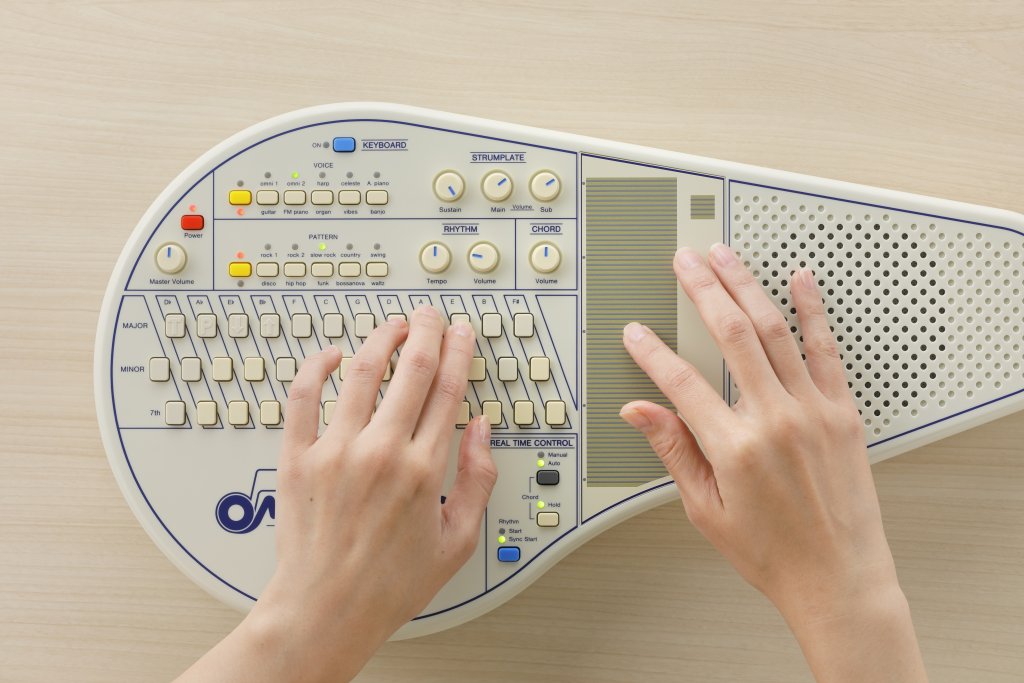
Get comfortable with the main controls, hold a friendly C-major chord and make your first gentle sweep across the strumplate. Aisling takes it one step at a time, then shows you how to stop the sound with Instant Off.
Read the lesson transcript
Aisling: Right, let’s get you properly introduced to your Omnichord.
First, get yourself comfortable, with the Omnichord in front of you. A table or desk is probably the best place to begin. You can attempt dramatic stage poses later, giggle, once you know what all the buttons do.
Now, switch the power on.
Turn the Rhythm Volume all the way down for the moment.
Set the Chord Volume to roughly the nine o’clock position.
Next, switch Real Time Control to Manual.
Adjust the two Strumplate Volume controls and the Sustain control to the positions shown on screen.
Now place your left hand comfortably over the chord buttons, so you can reach them naturally.
Choose a chord to begin with. C-major is friendly and unlikely to cause any trouble.
Press and hold the C-chord button with your left hand.
Keep your right hand nice and relaxed. Place your index finger on the part of the strumplate nearest to you, then gently slide your finger away from you, along the length of the plate.
And there you are — your first strum!
Give it another go. Repeat the movement a few times, slowly and gently, until it begins to feel natural. There’s no rush. The Omnichord has waited patiently this long; it can wait another minute.
When you’re ready to stop the sound, touch the Instant Off touch-plate.
That was grand! You’ve just played your first chord and performed your very first Omnichord strum.
When you need it
Everyday OM-108 reference.
The technical answers are kept below rather than placed in your way. Open only the question that matches what you are trying to do.
Power and batteries
Can I power the OM-108 using USB-C?
Short answer: no. The OM-108 does not support USB-C power.
The OM-108 uses a dedicated DC input. Suzuki chose a standard barrel socket because it is robust, familiar to musicians and less likely to be made obsolete by changes in computer or phone charging standards.
What adapter does the OM-108 need?
The OM-108 requires a 12V DC, 1A switched mode power supply with a 5.5 x 2.1 mm barrel plug and centre-negative polarity. The centre pin is negative.
Where possible, use the official OM-108 adapter. Older transformer-style adapters can introduce excessive noise and may not work correctly. Do not experiment with random adapters as a test.
Can I leave batteries in while using the adapter?
Short answer: yes. It will not damage the instrument.
The DC socket includes a switch that disconnects the battery circuit when the adapter plug is inserted. As with any battery-powered instrument, remove batteries if the OM-108 will be stored for a long period.
Cleaning and care
How should I clean the OM-108?
Use a soft dry cloth, or a damp cloth that has been wrung out tightly. For stubborn dirt on plastic parts, use a cloth lightly moistened with neutral detergent, then wipe clean with a soft dry cloth.
Do not use benzine, paint thinners or alcohol. These can cause deformation or discolouration, and they are not suitable for the OM-108 case or printed surfaces.
Can I service the chord or panel buttons myself?
Short answer: not during the warranty period, and not casually.
The OM-108 chord buttons use the familiar conductive pad design used from the OM-36 through to the Qchord era. On the OM-108, the panel buttons also use this style of contact rather than older tactile switches.
Skilled repairers can clean internal contacts, but the instrument must be completely disassembled. Owners should not attempt this during the warranty period, and contact sprays should never be sprayed into the instrument.
Voices and playing features
How do the layer and sub voice controls work?
The OM-108 has 10 preset voice selections. Each preset contains two factory assigned voices, so the layer and sub voice behaviour is built around those preset combinations rather than a free voice-mixing system.
Omni 1 blends the original OM-84 straight voice with the OM-84 vibrato voice. Omni 2 blends the original OM-84 straight voice with a richer modern orchestral string sound. Omni 2 is the preset that combines the analogue Omnichord character with a modern digital voice.
What does 108 chords mean?
The OM-108 expands the classic chord-bank idea to 108 chord options, adding sus4 and add9 choices alongside the familiar major, minor and seventh chord families. This gives players more songs within easy reach without losing the immediate Omnichord playing style.
MIDI and firmware
Does the OM-108 have MIDI IN?
Short answer: no. The OM-108 has MIDI OUT only.
It can send performance data to external MIDI equipment or software, but it cannot receive incoming MIDI to automate chords, drums or patterns. We will add a more detailed MIDI mapping note once it has been checked against the development and owner-manual notes.
What is the USB port in the battery compartment?
The battery compartment contains a USB port and a small PLAY/UPDATE switch. This was left in place for future expansion or firmware service use.
At present there are no public firmware files or user update tools. During normal use, leave the switch in the PLAY position.
Need the complete operating reference?
Suzuki's illustrated owner manual covers every control and connection. It opens inside Omnichord Heaven, with the original PDF still available separately.
Read the owner manual